New booking calendar: manage Booking, Airbnb and your pre-check-in from one place
If you manage one or more tourist accommodation in Spain, you know that every day starts the same: open booking, open Airbnb, open your own website calendar, look at who enters today, who comes out, who has the pre-check-in pending. Five tabs, five passwords, five different interfaces to do the same.
Today we fix it. comes the Reservation calendar A seshospedajes.es: A unique view where all your reservations meet, wherever they come from, and from where you can launch the pre-check-in with a click and see at a glance which guests have already completed it.
And the best: Available from the Basic Plan.
What you will see when entering
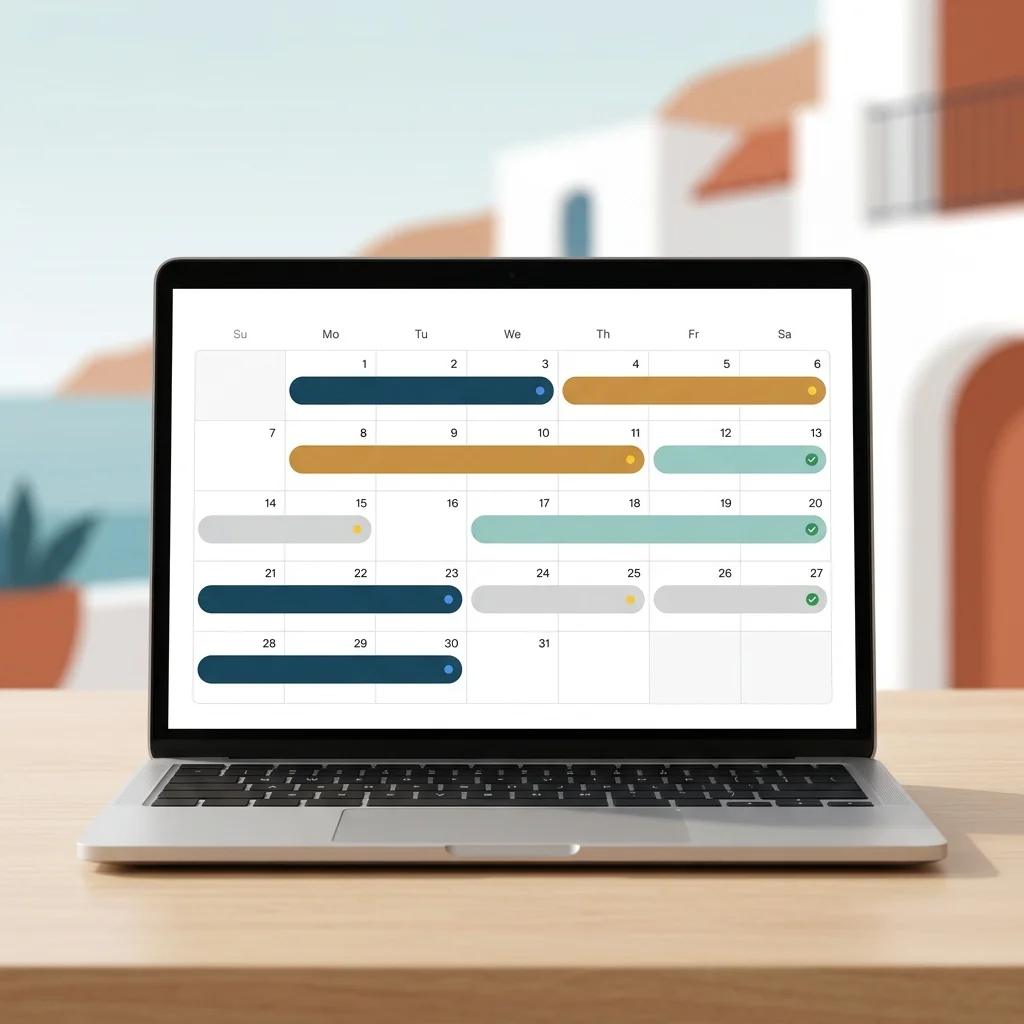
A clean calendar, Google Calendar, with all the reservations of your establishments colored by channel of origin. Each reservation occupies the days of the stay, bears the name of the guest (when the OTA provides it) and a small icon that tells you if you have already managed the pre-check-in:
- 🔵 without sending — You have not yet sent the link to the guest
- 🟡 Envoy — The guest has received it but has not yet responded
- 🟢 completed — The data is already recorded in the app
About the calendar, three quick markers so you don't miss anything:
- Tickets today: How many guests arrive
- Departures today: how many go
- next 7 nights: What are you busy this week
And if you prefer an Agenda type view with table and rows (especially useful on mobile), you have the List view sorted by date of entry with all data in view.
The detail of each reservation, in a click
When you click on a reservation, a panel opens with everything that the OTA has sent us: dates, number of guests, channel of origin, amount (if it comes), contact details of the main guest, observations.
From that same panel, depending on where you are in the process, you have the actions you need:
- If you haven't sent the pre check-in yet → botón “Enviar pre check-in”. Genera el link y, si tienes el email del huésped, se lo manda automáticamente.
- yes you already sent it but they have not answered → “Reenviar” o “Copiar link” (por si quieres mandarlo por WhatsApp).
- If the guest already completed it → “Ver datos del huésped” te lleva directamente a su ficha, lista para incluir en el envío SES.
without jumping between modules. Without going back to the dashboard. without losing context.
Filters for hosts with multiple hosts
If you manage more than one apartment (and we know that many of you have 3, 5, 10 or more), the calendar lets you filter:
- By establishment — To look at only one
- By channel — Only booking, only Airbnb, only your own website, etc.
- By pre-check-in status — To see at one blow who you are missing
All filters are combined, so you can answer in two clicks to questions like “¿quién llega esta semana al apartamento del centro que aún no me ha mandado el DNI?”.
The difference between BASIC and COMPLET
The calendar is available for all plans from the BASIC, because we believe that it is a management tool that every host needs. But there is an important nuance in how the data is filled:
Basic Plan — Operating Calendar
You see the calendar, you manage your pre check-in from it, you see the states, filters, exports. all functional. Reservations are entered by you as you have guests (or when you create a contract).
Complete Plan — Calendar on Autopilot 🎯
This is where the tool becomes really powerful. In the complete plan we activate the Automatic sync with Booking, Airbnb, VRBO and any platform that exports iCal (which are practically all). Your reservations appear alone in the calendar, updated every few minutes, without having to copy anything by hand.
A new reservation in Booking → appears in your calendar → you send the pre-check-in → when you complete it, the data is ready for shipping SES. Accommodations to the Ministry of the Interior. All flow, automated.
It is the difference between having a well-organized paper agenda (BASIC) and having an agenda that fills in with the information of your sales channels (COMPLET).
Why does sync with Booking and Airbnb matter so much?
Any host with a couple of apartments on different platforms knows the pain: a reservation enters by booking while you are having dinner, someone asks you on WhatsApp if you have free the week of the 15th, you open Airbnb and it turns out that there is also a new reservation that you had not seen. double reserve. Resolution vs. clock. negative review.
With Complete iCal sync, all confirmed reservations on your platforms automatically reach a single site. It doesn't block dates on the OTAs (you keep doing it from Booking/Airbnb as it has been up to now), but it does give you the Consolidated view that you didn't have until now.
And as each reservation is linked to its pre-check-in and its guest, The entire chain of regulatory compliance is recorded and traceable: Reserve → Pre Check-in → Guest Data → Shipping to SES.Hospedajes Ministry of Homepage → Annual VUD Report.
what the calendar is not
So that there is no confusion, we want to be clear with what this functionality does not make nor does it intend to do:
- ❌ It's not a channel manager. We do not write to Booking or Airbnb. Price management, availability and date lock are still done on each platform.
- ❌ It is not a reservation engine for your website. If you want a website with direct reservations, that is another tool.
- ❌ It does not replace your current workflow with OTAs. It complements it: it gives you the unique sight, automates the pre-check-in, connects you with the SES.
Is a Well-made management utility, not a pretensioned PMS. And that's exactly what most independent hosts were asking of us.
How to start
If you are already a user of seshospedajes.es
Enter the app and you will see the new link “Calendario” in the main menu. If you are in Basic, you can already use it. If you want automatic sync with Booking, Airbnb and your own website, Activate the Complete plan from your billing portal o Contact support.
If you are not a user yet
Take a look at the plans and prices. The Basic Plan gives you the SES regulatory compliance + Single Digital Window + NRUA + the new reservation calendar. The COMPLET plan adds automatic sync with Booking/Airbnb, Excel import, API, and the rest of the Pro functionalities.
next thing coming
The reservation calendar is the first piece of something larger. In the next few weeks we will add:
- Automatic guest reminders if it takes time to complete the pre-check-in
- Internal notes by reservation
- Export to PDF / Printing of weekly planning
- More hosts on request from hosts (some regional platforms and specific PMSs)
If you manage tourist accommodation in Spain and you can think of something that is missing, Write us for the support or for him WhatsApp channel. The next improvements are decided by you.
seshospedajes.es — The easy and automatic way to comply with the regulations of tourist accommodation in Spain. SES. Hospedajes del Interior Ministry, Single Digital Window, NRUA and now also comprehensive management of your reservations.